
Ever found yourself in a situation where your call drops, or your internet stops working right when you need it the most? In the UAE, where connectivity is key, knowing your mobile balance is essential. Whether you’re on a prepaid plan or a postpaid contract, staying on top of your usage saves you from unexpected service interruptions and bill shock.
This comprehensive guide will walk you through every method to perform a Du balance check, including how to check your Du data balance, Du prepaid balance, and Du postpaid balance.
Instant, Easy & Free: The Power of Du Balance Check
In today’s fast-paced world, convenience is everything. Du, one of the leading telecom providers in the UAE, offers multiple ways to check Du balance, ensuring you’re always in control of your spending and usage. These methods are not just about knowing your remaining credit; they are about managing your digital life effectively.For beginners and anyone new to the Du network, the sheer number of options can seem confusing.
Don’t worry, Here we’ve broken down each method so you can choose the one that works best for you.
1: The Classic USSD Code (For Prepaid & Postpaid)
The USSD (Unstructured Supplementary Service Data) code is arguably the fastest and most common way to get an update. This method doesn’t require an internet connection, making it perfect for when you’re traveling or have run out of data.
To perform a Du balance check using the USSD code:
- Open your phone’s dialer.
- Dial *135#
- Press the call button.
📌 Tip:
       This is your go-to method for a quick Du credit balance check when you're in a hurry.
2: Check Your Balance via SMS
If you prefer a text-based response that you can save and refer to later, the SMS method is for you. This is also a great alternative if the USSD pop-up is not working for some reason.
To check your Du balance via SMS:
- Open your messaging app.
- Create a new message.
- Type the word “balance” (case-insensitive).
- Send the message to the shortcode 1335.
3: The Du App – Your All-in-One Solution
For people who use smartphone apps a lot, the official Du app is a game-changer. It’s more than just a tool to check Du balance; it’s a complete account management portal.
To use the Du app:
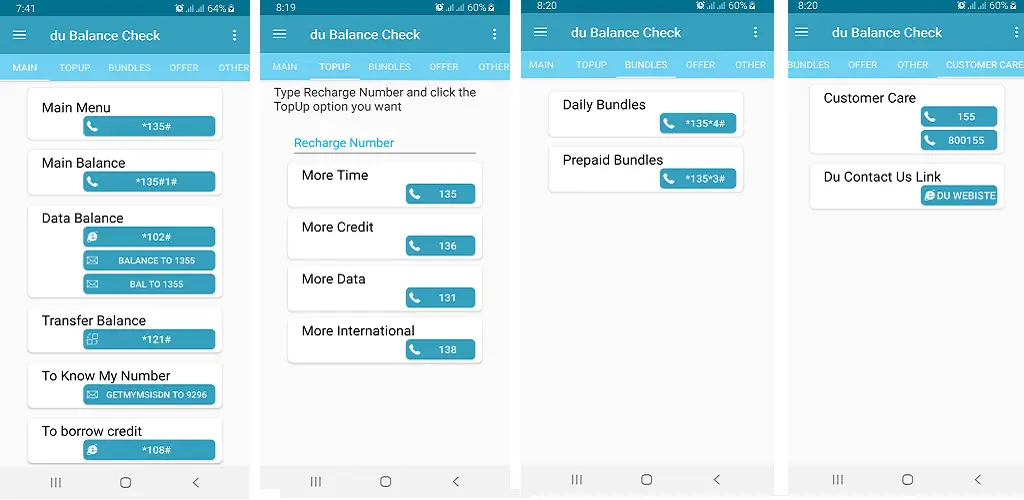
- Download the official “Du” app from the Google Play Store or Apple App Store.
- Sign up or log in using your Du mobile number.
- Once logged in, your main Du account balance and data usage will be displayed right on the home dashboard.
The app provides real-time updates and detailed usage history. You can see how much data, calls, and SMS you have used, and even manage your subscriptions, top up your account, and pay bills.
4: The Official Du Website
If you prefer to use a desktop or laptop computer, the Du website offers the same full account management as the app.
- Go to the official Du website.
- Click on “My Account” or “Login.”
- Enter your mobile number and password or use the OTP to log in.
- Your dashboard will show your Du balance, bill details, and usage history.
5. IVR System (Automated Voice Assistance)
An IVR System (Interactive Voice Response System), sometimes called Automated Voice Assistance, is a phone technology that lets customers interact with a company’s services through pre-recorded voice menus and keypad (DTMF) inputs—and sometimes through speech recognition.
- Dial 135 from your Du number.
- Follow voice prompts (e.g., press 1 for balance).
- Receive balance details via SMS or voice message.
Understanding Your Du Balance: Prepaid vs. Postpaid
The way you check your balance can slightly differ depending on your plan.
| User Type | Feature | Description | Benefits | How to Activate / Use |
|---|---|---|---|---|
| Prepaid Users | Recharge Alerts | Receive SMS notifications when data usage reaches 75%, 85%, and 100% to avoid sudden disconnections. | Prevents unexpected service cutoffs and helps manage usage better. | Automatically enabled for all prepaid users. |
| Prepaid Users | Auto-Renewal | Enable auto-renewal via the Du app to ensure your plan renews automatically without manual top-ups. | Convenience and uninterrupted connectivity without manual recharges. | Activate from Du app → My Plan → Auto-Renewal Settings. |
| Postpaid Users | Bill Due Dates | Set payment reminders in the Du app or website to avoid late fees and service interruptions. | Avoids late payment charges and keeps service active without disruption. | Set reminders in Du app → Billing → Reminders or via SMS alerts. |
| Postpaid Users | GCC Roaming | Monitor your roaming data usage easily by visiting mydata.du.ae while traveling. | Stay in control of roaming costs, avoid bill shock, and manage usage abroad. | Visit mydata.du.ae while roaming in GCC countries. |
Du Prepaid Balance Check
If you have a prepaid phone, your balance is the amount of credit you have left to spend on calls, data, and text messages. It’s important to regularly check your Du prepaid balance to avoid service interruptions. The methods mentioned above (USSD, SMS, App, and Website) are all effective for prepaid users.
Du Postpaid Balance Inquiry
If you pay your bill after you use it, your balance check is basically a way to find out how much you will be charged. It shows your current usage and the amount you still owe. Regular Du postpaid balance inquiries help you track your usage and avoid unexpected high bills.
- SMS: Text “BILL” to 1335. Du will send you an SMS with your current outstanding bill.
- App & Website: The Du app and website are the best tools for postpaid users, as they provide a full breakdown of your bill, including voice calls, data usage, and any additional charges.
Advanced Tips for Managing Your Du Balance
1. Use the Du App Smartly
- Track real-time data, calls, and SMS usage.
- Set custom data usage limits inside the app to avoid unexpected charges.
- Turn on auto-renewal for your most-used plans.
2. Activate Balance Alerts
- Set SMS or app alerts when your balance drops below a certain threshold (e.g., AED – 5 ).
- Prevents accidental service cutoffs when traveling or in emergencies.
3. Take Advantage of Du Self-Care Portal
- Log in to mydata.du.ae to check usage details without needing the app.
- Useful when roaming, as you can track real-time consumption.
4. Bundle Services to Save More
- Consider combo plans (data + calls) instead of separate add-ons.
- Du often provides discounted bundles when purchased via the app.
5. Use Data Rollover (if available)
- On certain plans, unused data rolls over into the next month.
- Ensure you’re subscribed to a plan that supports this feature.
6. Leverage USSD Shortcuts
- Dial *135* for quick balance checks and offers.
- Use USSD codes for instant activation of add-ons without internet.
7. Schedule Auto-Payments (Postpaid Users)
- Avoid late fees by enabling credit/debit card auto-pay inside the Du app.
- Get reminders before the deduction date for better budgeting.
8. Roaming Smartly
- Before traveling, buy a Du roaming bundle instead of using pay-as-you-go rates.
- Monitor usage abroad with mydata.du.ae.
9. Check for Seasonal & Loyalty Offers
- Du frequently offers bonus data, cashback, or discounts during promotions.
- Check notifications in the Du app to claim these deals.
10. Keep Emergency Credit Enabled (Prepaid)
- Du offers emergency credit when your balance runs out unexpectedly.
- Dial *108# to activate and repay upon next recharge.