
Account holders in the Emirates often need a quick SNB balance reading without a trip to Saudi Arabia. A SNB balance check is possible through five main routes: the mobile app, online banking, an ATM, SMS, and phone banking. Expats, Saudi nationals living in the UAE, and families who send or receive remittances all rely on these tools.
This guide follows the SNB account journey from setup to troubleshooting, and jump links help readers reach any method fast. Everyday SNB banking from abroad works best when preparation comes first.
What Is SNB and Who Needs to Check an SNB Balance from the UAE?
Saudi National Bank (SNB) at a Glance
Saudi National Bank (SNB) is a leading Saudi lender serving personal, business, and wealth customers. The brand is still often called SNB AlAhli, and older materials may mention AlAhli Bank. The institution operates under the supervision of the Saudi Central Bank (SAMA), the national regulator.
The NCB–Samba Merger and What It Changed for Customers
The union of the Saudi National Commercial Bank and Samba produced today’s Saudi National Bank, with a single brand and refreshed channels. Familiar names such as AlAhli Mobile and AlAhli Online survived the change, so customers who check AlAhli bank account funds may still see the old name. Some profiles run through the AlAhli Mobile application, others through the AlAhli Online platform, and newer ones through the SNB Mobile application.
Common UAE-Based SNB Account Holder Profiles
Typical profiles include professionals paid in riyals, students, retirees, and relatives of workers abroad. Most want to see their SNB funds after a salary or transfer, and many keep a SAR currency balance that is converted later. Frequent senders also lean on SNB QuickPay for quick domestic payments.
Do You Need to Be in Saudi Arabia to Check Your Balance?
No. Physical presence is not required when SNB digital banking is active and the registered mobile can receive codes. Searches like SNB check balance in Saudi Arabia and SNB balance inquiry Saudi Arabia suggest many people assume a local presence is needed. In practice, SNB banking services in Saudi Arabia include remote tools, and Saudi National Bank digital services reach the UAE too. That covers SNB mobile banking as well.
SNB Balance Check Methods Overview: Which Option Fits You?
| Method | Cost | Speed | Works from UAE? | Requirements |
|---|---|---|---|---|
| SNB app | Data only | Instant | Yes | Activated profile |
| SNB online banking | Data only | Instant | Yes | Credentials and code |
| SNB ATM | Possible fee | Fast | Depends on card | Card and PIN |
| SMS | Operator rates | Fast | Often | Registered mobile |
| Phone | Call rates | Moderate | Yes | ID verification |
Digital vs. Physical Channels
Digital channels include SNB mobile, SNB internet banking, and other SNB online tools. Physical channels cover ATMs and branches. A Saudi National Bank balance inquiry through digital tools avoids queues, and customers can view Saudi National Bank balance details in seconds.
What You Need Before You Start
- A working SNB login
- Your bank account number
- Your International Bank Account Number (IBAN)
- Your registered mobile number
- A valid ID
📌 Tip: The best SNB balance check method depends on the moment: the app for daily use (paired with alerts for a morning check), or a call, ATM, or SMS for emergencies, weak internet, or when you'd rather not use the app.
How to Check SNB Balance Using the Mobile App
Downloading the Official App (iOS and Android)
- Install only the official listing from the Apple App Store or Google Play.
- Be wary of lookalike apps, since they copy logos.
- Searches such as “Saudi National Bank balance check app” and “SNB bank balance check app” often surface impostors.
- Check the publisher name before installing.
First-Time Registration and Activation Steps
SNB account registration begins with ID and card details. The SNB mobile app activation step then confirms the device. Customers who search SNB check balance with account number will find that the number helps link the profile to the right customer record.
Logging In: Password, Biometrics, and OTP
- Enter your SNB account login credentials.
- Confirm your identity through mobile banking authentication, using a One-Time Password (OTP) or a fingerprint.
- Complete Two-Factor Authentication (2FA), which adds a second proof.
- The SNB one-time password protects each session.
- Banking security verification and balance inquiry authentication run in the background to support secure balance checking.
- The login screen follows these steps in sequence.
Step-by-Step: Viewing Your Account Balance
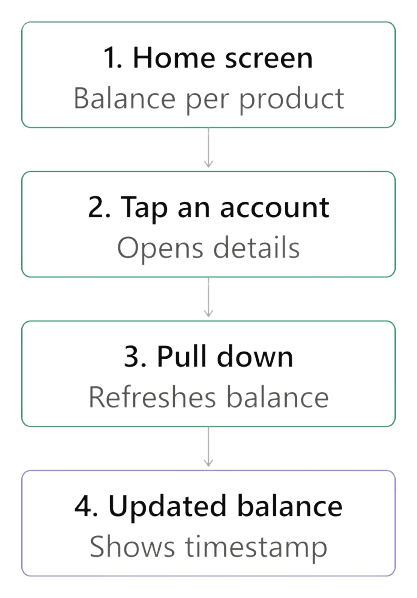
Viewing Balances Across Multiple Accounts, Cards, and Currencies
Accounts, cards, and currencies share one screen, giving an SNB digital account balance overview. Users can view SNB account funds for each product. SNB current account balance details and SNB savings account balance inquiry options appear separately, reflecting SNB current account services and SNB savings account services. An SNB card linked account balance also appears, along with SNB available balance information. Many customers use SNB account balance via AlAhli Mobile or an AlAhli Mobile balance check for this view.
Using the App While Travelling or Living in the UAE
SNB mobile banking account access works over Wi-Fi or mobile data, and SNB mobile banking accessibility features such as biometrics keep checks quick. A typical SNB account balance through mobile request returns an SNB mobile banking balance display within seconds. Searches such as SNB check balance by mobile, SNB account balance check mobile, and SNB balance inquiry mobile app all point to this route.
Notifications and Alerts That Show Balance Changes
An SNB balance notification arrives after account activity, and an SNB account balance notification service can be switched on in settings. SMS transaction alerts and Push notification banking differ: texts depend on the network, while pushes depend on data. SNB account alerts configuration and SNB account activity monitoring make SNB account balance monitoring automatic, so customers can monitor SNB account funds continuously.
How to Check SNB Balance via Online Banking (Web)
Accessing the Official Portal Safely
The Online banking portal should be opened by typing the official address, not by tapping links in messages. People who type SNB check balance online into a search engine should avoid sponsored lookalikes. Likewise, Saudi National Bank balance check online searches deserve the same caution.
Registering for Online Banking
SNB online banking enrollment needs card details, ID information, and a registered mobile. SNB internet banking authentication follows through a code sent to that mobile, and the profile is then ready for use.
Step-by-Step: Viewing Your Balance on Desktop
- The dashboard doubles as a digital banking dashboard and lists every product.
- An account overview appears first.
- Balance access is a single click away.
- Customers can view balance details and account information together, including through AlAhli Online.
- Common searches all lead to this same screen:
- SNB account balance check online portal
- SNB balance inquiry online banking
- SNB bank balance check online
- AlAhli Online balance inquiry
- SNB check account balance online
Downloading Statements and Account Details
An SNB statement can be saved as an Electronic bank statement, and SNB account statement generation lets users pick a date range. Customers can retrieve SNB balance details such as opening and closing amounts through SNB bank statement balance details. A similar SNB account statement through mobile app option exists for phones.
Browser and Device Requirements
Updated browsers with JavaScript and cookies enabled work best, and outdated software can block login. Occasional SNB banking system maintenance windows may pause the portal, so a short wait is often the only fix.
📌 Tip: Regular logouts, device updates, and weekly checks to review SNB banking funds catch problems early.
Checking SNB Balance at an ATM
Can You Use SNB ATMs from the UAE?
The SNB ATM network sits in Saudi Arabia, so UAE visits to a Saudi machine happen only during trips there. In the UAE, a card may work at other machines through international networks. SNB ATM banking services differ by location. The mada payment network, run by Saudi Payments, mainly serves domestic use.
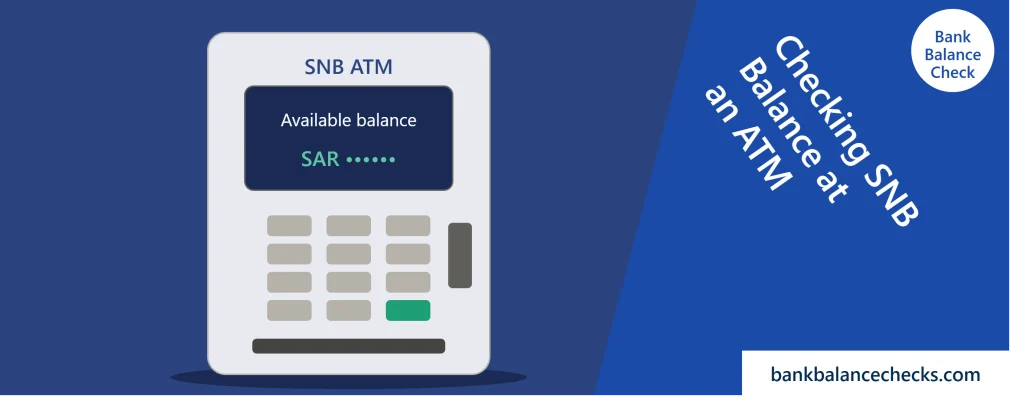
Using an SNB Card at UAE or International ATMs
An SNB card with international use enabled may work at UAE machines. An SNB debit product connects through Debit card account linkage, so SNB debit card balance checking reflects the account itself. An SNB credit product shows the credit limit rather than savings. Searches such as SNB check balance with debit card describe this scenario.
Step-by-Step ATM Balance Inquiry
- Insert your card.
- Pick a language.
- Enter your Personal Identification Number (PIN).
- Select balance.
Fees and Currency Considerations for International Balance Inquiries
Some operators charge a fee for balance inquiries abroad, and the card issuer may add its own charges. Amounts are normally shown in riyals, so conversion to dirhams is a separate mental step. The official fee schedule remains the safest reference.
ATM Mini Statement Option
A mini statement lists recent SNB transactions. It mirrors SNB account transaction records drawn from the Account transaction ledger, which gives a snapshot of the latest activity.
Checking SNB Balance by SMS and Phone Banking
SMS Banking: Setup, Commands, and Limitations
SNB SMS banking notifications require a registered mobile number, and commands or short codes should be confirmed on the official site. Limits include roaming delays and message charges.
Phone Banking and Automated Voice Service
The automated voice service supports SNB balance inquiry using phone, and searches like SNB check balance on phone and SNB account balance check service point here. After verification, SNB balance access is granted through the voice menu, and customers can retrieve Saudi National Bank balance information by speaking to an agent.
Calling Customer Service from the UAE (International Dialing and Hours)
Calls from the UAE need the international dialing format, and service hours should be checked in advance. SNB customer support channels also include chat and branches, which helps when calls queue.
📌 Tip: A single SNB balance inquiry by call can cost more than an app check, especially on a roaming plan. Wi-Fi calling or a local alternative can reduce the bill.
Identity Verification Requirements
Agents ask for ID details, security answers, and sometimes a code. SNB account verification methods vary by channel, and an SNB account inquiry by phone follows the same rules.
Other Ways to Check Your SNB Balance
Visiting a Branch (Documents Required)
A branch offers SNB balance checking without ATM or app, though ID and the card are required. Staff can verify AlAhli account balance details face to face. SNB check balance without login is generally not possible, because identity must be proven.
Receiving Account Alerts Automatically
Automatic alerts mean customers review SNB account balance changes without opening anything. Texts or pushes arrive after each transaction.
Third-Party Apps and Open Banking Aggregators (Pros, Risks)
Aggregators can find SNB bank balance data next to other accounts. The trade-off is sharing credentials with an outside provider, so only licensed services merit consideration.
Balance Inquiry via Official Social or Chat Support (What Is and Isn’t Safe)
Official chat can answer general questions, but full account numbers, passwords, and codes should never be posted publicly. Messages from unofficial pages should be ignored.
How to Activate or Register for SNB Digital Banking from Outside Saudi Arabia

Eligibility usually requires an active account, a valid ID, and a registered mobile. A card is often needed for first-time activation.

Activation may happen at an ATM, a branch, or remotely, depending on the profile. Remote options help people living abroad, but availability varies.

Changing the registered number while abroad may need a branch visit, a verified request, or an in-app process. Updating the number before travel prevents most lockouts.

Codes sent to a UAE number can fail if the bank holds an old Saudi number. Matching the registered number to the active SIM solves most delivery problems.

Biometrics and device binding tie the profile to one phone, which speeds up login. A new phone requires re-binding.
Checking SNB Balance While Living or Travelling in the UAE
Roaming SMS and Data: Costs and Best Practices
Roaming charges apply to texts and data, so customers often rely on Wi-Fi or a local plan. Turning off background data in the app reduces surprises.
Using Wi-Fi vs. Mobile Data Securely
Home or trusted Wi-Fi is safer than public hotspots. Mobile data is usually the better choice outside the home.
Time Zone and Service Availability
The UAE is one hour ahead of Saudi Arabia, so scheduled maintenance can land at unexpected local times. Checking service notices avoids confusion.
Currency: SAR Balance vs. AED Equivalent
Balances appear in riyals, so dirham equivalents need a separate exchange-rate lookup. Customers can see SNB available funds in riyals and convert them on their own.
Travel Notices and Card Restrictions Abroad
Cards may need international use enabled, and travel notices can prevent blocks on UAE spending. Settings should be checked before departure.
Troubleshooting: SNB Balance Not Showing or Check Failing
Login Failures and Locked Accounts
Repeated wrong attempts lock access. SNB account access recovery usually requires identity verification, a reset code, or a branch visit.
OTP Not Received in the UAE
Missing codes usually trace back to an outdated number, signal issues, or a blocked sender. Restarting the phone and confirming the registered number are the first steps.
Balance Not Updating or Showing Incorrectly
A stale SNB balance update often comes from caching, so refreshing helps. SNB account balance discrepancies can appear when SNB pending transaction amounts are included. SNB available versus current balance differ for the same reason, and Available balance calculation subtracts holds. Delays can also come from SNB account transaction processing inside the Core banking system. When the Account balance inquiry system is slow, the SNB account balance check procedure may fail temporarily.
App Crashes, Errors, and Compatibility Issues
SNB mobile app troubleshooting starts with updating the app, restarting the phone, and checking system compatibility. Reinstalling the official app fixes many errors.
Dormant, Blocked, or Restricted Accounts
Inactive or restricted profiles can limit SNB account funds availability, and the bank must lift the restriction before checks work normally.
When and How to Contact SNB Support
Support should be contacted when lockouts, missing codes, or wrong balances persist. Verified channels protect against scams.
Security Tips: Check Your SNB Balance Safely
Recognizing Phishing, Smishing, and Fake SNB Messages
Urgent texts with links, odd sender names, and requests for credentials signal fraud. SNB online banking security depends on ignoring such messages and using official channels.
Never Share These Details (PIN, OTP, Password)
Card codes, one-time codes, and passwords stay private, even with someone claiming to be bank staff. Real staff never ask for them.
Public Wi-Fi and Shared Device Risks
Public networks and shared computers expose logins. Private connections and full logouts reduce risk.
What to Do If You Suspect Unauthorized Access
Passwords should be changed immediately, the card blocked, and the bank contacted at once.
Reporting Fraud
Fraud should be reported to the bank and, where relevant, local authorities, with screenshots and timestamps kept as evidence.
Beyond Balance Checks: Other Useful SNB Account Features
Mini Statements and Full Statements
Mini statements show recent entries, while full statements cover chosen periods and can be saved for records or visa paperwork.
Viewing Transaction History
SNB account transaction history can be filtered by date and amount, which helps spot errors.
Setting Low-Balance and Transaction Alerts
Low-balance alerts warn before an account runs short, and transaction alerts flag unusual spending early.
Transferring Funds and Paying Bills
Transfers and bill payments run through the same channels, and the SADAD payment system handles many Saudi bills.
Managing Cards (Freeze, Limits, Online Use)
SNB debit card management covers freezing, limits, and online use. SNB card and account linking keeps cards tied to the right accounts, and other SNB digital banking features extend this control.
Sending Money from the UAE to an SNB Account and Confirming It Arrived
Common Transfer Routes (Exchange Houses, Bank Transfer, Remittance Apps)
Senders choose between exchange houses, bank transfers, and remittance apps, each with different fees and speed. The SNB QuickPay service may speed up the domestic leg.
Information Needed (Account Number, IBAN, Beneficiary Name)
Senders need the beneficiary’s exact name, the account number, and the IBAN. A single wrong digit can delay or return the payment.
Typical Transfer Times
Transfers can land within minutes or take a few business days, depending on the route and cut-off times. Weekends and holidays add delay.
How to Check the Balance to Confirm Receipt
Recipients can verify SNB account funds in the app. SNB available funds verification confirms whether money is spendable, and SNB account balance after transfer shows the new total. The SNB account balance after deposit should match the amount sent, minus any fees. SNB real-time account balance information helps confirm quickly, and an SNB QuickPay account balance check works for domestic transfers.
What to Do If the Transfer Hasn’t Arrived
The sender should keep the reference number, confirm details with the provider, and contact the bank if the delay passes the quoted time.
SNB Balance Check Methods Compared
App vs. Online Banking vs. ATM vs. SMS vs. Phone (Detailed Table)
| Method | Best for | Main limit |
|---|---|---|
| App | Daily checks | Needs data |
| Online banking | Statements | Needs a computer |
| ATM | Cash and card users | Location and fees |
| SMS | Weak internet | Roaming charges |
| Phone | Emergencies | Cost and wait times |
Common Mistakes and Pro Tips
Wrong passwords, outdated phone numbers, and repeated failed attempts cause most locks. Slowing down avoids them.